
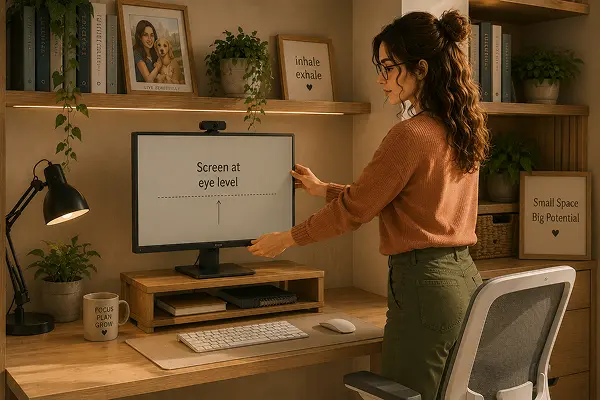
Finding efficient smart monitor stands for small desks became my solution when my neck had been aching for three weeks and I needed an ergonomic change. The stand cost 22 euros. Within two days, the ache was gone. That’s the kind of simple, immediate impact that good desk accessories can have, and it’s why the monitor stand is one of the first things I recommend to anyone setting up a home office on a small desk.
Why Screen Height Matters So Much
The top of your monitor should be roughly at eye level so your gaze falls naturally to the centre of the screen. Most monitors and laptops sit far too low on a standard desk, causing you to look downward for hours, which places significant strain on the neck and upper back over time. A monitor stand is the simplest fix for this, and it also frees up desk space underneath for a keyboard, documents, or storage.
Dual monitor setups add a layer of complexity worth mentioning briefly. If you split time evenly between two screens, both should sit at the same height and roughly the same distance, an uneven setup trains your neck to favour one side over the other throughout the day, often without you noticing until discomfort builds up.
Functional Monitor Stand Categories for Your Space
Fixed-height monitor stands
The simplest and most affordable option, a platform that raises your monitor by a fixed amount (usually 10–15 cm). These work well if your desk height and chair height are already correctly matched to your body. They often include a drawer or shelf underneath for keyboard storage, which is genuinely useful on small desks.
Adjustable monitor arms
The most flexible solution. A monitor arm clamps to the edge of your desk and allows you to position the screen at any height, angle, and distance. This is particularly valuable on small desks because it lifts the monitor entirely off the desk surface, reclaiming that space completely. The arm folds away when you’re not working, which is useful in multipurpose rooms.
Laptop risers
If you work primarily from a laptop, a riser that angles or elevates the device, combined with an external keyboard and mouse, replicates the ergonomic benefits of a monitor stand. Portable versions fold flat, making them excellent for people who occasionally work from different locations.
What to Look for When Buying
- VESA compatibility — if buying a monitor arm, check that your monitor has VESA mounting holes (most do, but worth confirming)
- Desk clamp strength — on small, thin desks, make sure the clamp fits your desk edge thickness
- Weight capacity — especially for larger or heavier monitors; check specifications carefully
- Cable management — built-in cable routing keeps the setup clean on a small desk
- Desk footprint — on compact desks, a stand with a small base or a clamp-mounted arm saves surface space
Durable Options Ranked by Budget
Under 30 euros
A simple fixed-height stand with a keyboard shelf underneath. The VIVO and Huanuo ranges offer reliable options in this price range. Not adjustable, but effective and space-saving.
30–70 euros
An entry-level adjustable monitor arm. The Invision MX150 is consistently well-reviewed in this range, stable, smooth to adjust, and cable-management friendly. Worth the step up if you want flexibility.
70–150 euros
Mid-range monitor arms from Ergotron or Amazon Basics (which uses Ergotron components). The Ergotron LX in particular is widely considered the benchmark for home office monitor arms — smooth, stable, and built to last. I’ve used mine for three years without a single issue.
Installing and Adjusting Correctly
A monitor stand fixed correctly still needs to be adjusted correctly, and this is the step most people skip. Once installed, sit in your normal working posture and check that the top third of the screen sits roughly at eye level, not the centre of the screen, which is a common mistake that leaves the monitor slightly too low even with a stand in place.
Distance matters as much as height. The screen should sit roughly an arm’s length away, close enough to read comfortably without leaning forward, far enough that you’re not straining to focus. If you wear glasses for screen work specifically, factor that prescription distance in before finalising the position, it’s worth adjusting the stand again after a day of actual use rather than assuming the first setting is right.
For monitor arms in particular, take the time to balance the tension correctly. An arm that’s too loose will droop under the monitor’s weight over time, while one that’s too tight makes small adjustments frustrating. Most quality arms have a tension adjustment screw specifically for this, and it’s worth setting properly rather than living with a slightly wrong position because readjusting feels like a hassle.
A Small Desk Can Work Harder Than You Think
The right monitor stand, or monitor arm, transforms a cramped desk into an organised, ergonomic workspace. The desk space you reclaim is often the difference between a setup that feels pressured and one that feels genuinely functional.
Measure your desk. Check your monitor. Then buy the stand that fits both. It’s one of those small changes that you’ll wonder how you managed without.
About Olivia
Olivia Knows Things is the editorial voice behind this blog, created to share practical, tested ideas that help people create beautiful, comfortable, and sustainable homes.