
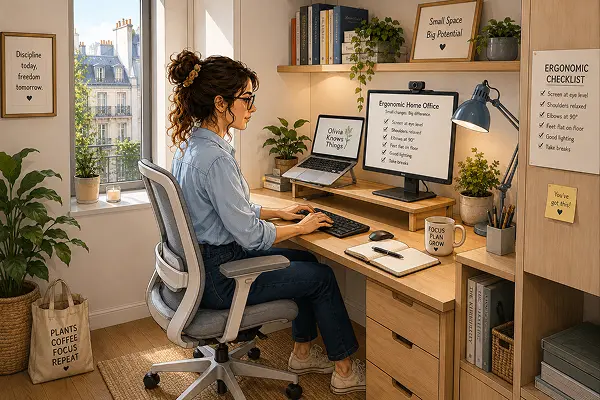
Learning how to setup an ergonomic home office in a small apartment bedroom became a necessity when I started working from home full-time with a laptop on the bed and a pillow propped behind me. Within three weeks, I had a persistent ache between my shoulder blades that didn’t go away on weekends. My bedroom had become my office, and my body was paying the price.
Setting up an ergonomic home office in a small apartment bedroom is entirely possible — but it requires thinking differently about the space. Here’s what actually works.
The Core Problem With Bedroom-Office Setups
Bedrooms weren’t designed for focused work. The lighting is usually warm and low, the furniture is soft and reclined, and the psychological association with rest works against productivity. An ergonomic setup addresses the physical issues — but you’ll also want to create some visual separation between your work zone and your sleep zone, even in a tiny room.
Step-by-Step: Building Your Bedroom Office
Step 1 — Choose the right spot
Position your desk away from the bed if at all possible — even at a 90-degree angle creates psychological distance. Facing a wall rather than the room reduces visual distraction. If the room allows, place the desk near a window for natural light, which reduces eye strain significantly compared to artificial light alone.
Step 2 — Get the desk height right
This is where most bedroom setups go wrong. A standard dining table is usually too high for comfortable typing; a coffee table is too low. Your elbows should be at approximately 90 degrees when your hands rest on the keyboard, and your wrists should be neutral — not bent upward or downward. If your desk is too high, a keyboard tray helps. If it’s too low, desk risers or a height-adjustable option is the real solution.
Step 3 — Sort the chair before everything else
The chair is the most important piece of ergonomic equipment in a home office. A proper ergonomic chair supports the lumbar curve of your lower back, allows your feet to rest flat on the floor, and positions your hips at or slightly above knee height. If budget is a constraint, a good ergonomic chair is where the money is best spent — far more than on a standing desk or accessories.
Step 4 — Raise your screen
Your monitor or laptop screen should be at eye level — the top of the screen roughly at the height of your eyes. Looking down at a laptop screen all day is one of the primary causes of neck strain in home workers. A simple monitor stand or laptop riser (from 15 euros) makes an immediate and noticeable difference.
Step 5 — Sort the lighting
Bedroom lighting is almost never suitable for work. Add a dedicated desk lamp with a daylight bulb (5000–6500K) positioned to the side of your dominant hand to reduce glare. If you’re on video calls, a small ring light positioned at face level improves both your appearance and your eye comfort significantly.
Creating Separation in a Small Space
When your bedroom is also your office, the visual boundary matters for sleep quality as well as productivity. A few simple strategies help:
- A small room divider or bookshelf between the desk and bed creates a visual break
- Covering your desk at the end of the workday — even with a simple cloth — signals to your brain that work is done
- Keeping work equipment off the bed entirely — no laptops, no phones, no notebooks
- A plant or small piece of art on the desk side of the room creates a distinct ‘work corner’ identity
The Minimum Viable Ergonomic Setup
If you’re starting from scratch with a limited budget, prioritise in this order: chair first, then screen height, then lighting, then desk surface. A good chair at a wrong-height desk still protects your back. A beautiful desk with a bad chair does nothing for your health.
Protecting Sleep Quality When You Work Where You Sleep
The ergonomic fixes matter for your body during the day, but a bedroom-office also needs attention to how it affects your sleep at night. Screens are the biggest culprit, the blue light from a monitor or laptop used right up until bedtime, in the same room you’re about to sleep in, can make it genuinely harder to fall asleep, since the brain associates that light and that space with alertness rather than rest.
A clear cutoff time helps more than most people expect, closing the laptop at least 30-45 minutes before bed, rather than working right up until you turn off the light. If evenings genuinely require screen time in the room, a blue-light filter or warmer display setting reduces some of the impact, though it’s a partial fix rather than a full solution.
Physical distance matters too, even in a small room. If the desk faces the bed directly, consider whether repositioning it, even slightly, so the screen isn’t the last thing visible before you close your eyes, makes a difference. Small adjustments like this cost nothing and quietly protect the one part of a bedroom-office setup that pure ergonomics doesn’t cover: how well you actually sleep afterward.
Small Space, Serious Work
Working from a bedroom doesn’t have to mean working uncomfortably. The changes that matter most — chair quality, screen height, lighting — don’t require much space. They require intention.
Set it up properly once, and your body will thank you every single day you sit down to work.
This article is for informational purposes only and does not replace professional medical advice. If you’re experiencing persistent pain, please consult a physiotherapist or doctor.
About Olivia
Olivia Knows Things is the editorial voice behind this blog, created to share practical, tested ideas that help people create beautiful, comfortable, and sustainable homes.