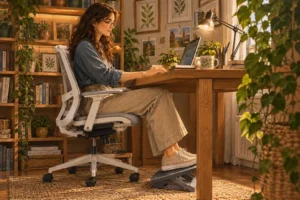
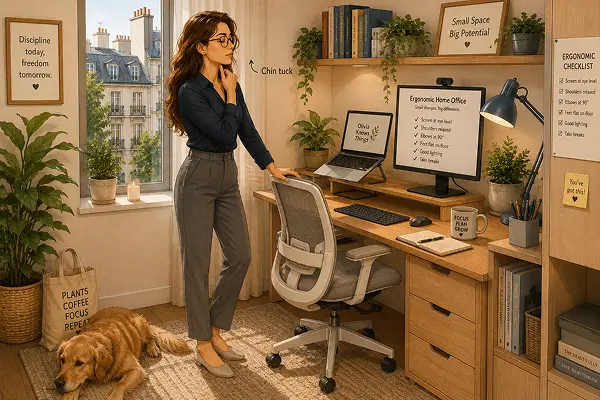
Shoulders that feel tighter on Fridays than Mondays. A neck that aches when you turn it too quickly. If you are looking for practical ways to reduce neck and back pain when working from home, small adjustments to your compact apartment desk can make a measurable difference. Most desk-related discomfort comes down to predictable mechanical strain rather than an inevitable part of remote work.
Understanding Where Desk Pain Comes From
Before changing your setup, it helps to understand what is causing the strain. According to the Mayo Clinic office ergonomics guide and the NHS sitting and workplace posture guidance, prolonged computer work typically triggers discomfort through three common posture patterns:
- Forward head posture: When a screen sits too low, the head drifts forward past the shoulders. Even a slight forward tilt significantly increases the load placed on the cervical spine and upper trapezius muscles.
- Rounded shoulders: Reaching forward toward a keyboard or mouse placed too far back on the desk pulls the shoulder blades apart and compresses the upper back.
- Loss of lumbar curve: Sitting on a dining chair or a seat without lower-back support causes the pelvis to tilt backward, flattening the natural inward curve of the lumbar spine over time.
Structural Setup Changes for Better Posture
Clinical guidance from organizations like the Mayo Clinic notes that minor mechanical back and neck strain often responds well to workstation adjustments within two to six weeks. In a compact apartment, you do not need a massive executive desk to apply core ergonomic principles outlined in the OSHA computer workstation guidelines and European display screen standards:
Raise your screen to eye level
This is the single most impactful adjustment for remote workers. The top edge of your monitor or laptop screen should sit roughly at or just below eye level, about an arm’s length away, so your gaze falls naturally toward the center without tilting your head down. Working directly on a laptop placed flat on a desk forces the neck into constant flexion. A simple aluminum laptop riser, a monitor stand, or a sturdy stack of hardcover books solves this immediately without taking up extra floor space.
Bring your keyboard and mouse closer
Your keyboard should sit close enough to the edge of the desk that your upper arms hang naturally beside your torso, with elbows bent at roughly a 90-to-100-degree angle. If you raise a laptop onto a stand, pairing it with a compact external keyboard and mouse becomes essential so your wrists and shoulders stay relaxed rather than reaching upward.
Support your lower back
Your lumbar spine needs gentle support to maintain its natural inward curve throughout the workday. If your chair has a flat or overly deep backrest, a common issue when working from a kitchen or dining chair, a small, structured lumbar cushion or a folded firm towel placed at the small of your back prevents slouching. Unlike soft bed pillows that shift and flatten quickly, a dedicated lumbar support holds its shape across long work blocks.
Check your foot and knee position
Ergonomic standards recommend keeping your feet flat on the floor with knees at or slightly below hip level. If raising your chair to match a standard dining table leaves your feet dangling or resting on tiptoes, tension builds in the legs and travels up the lower back. A compact footrest, or a flat, sturdy box tucked under the desk, stabilizes your posture immediately.
Building a Movement Habit That Sticks
No static posture, even an aligned one, is meant to be held for eight consecutive hours. The NHS emphasizes that changing positions regularly is just as important as chair and screen height, because gentle movement restores circulation and relieves sustained muscle load.
Setting a recurring 45-to-60-minute timer helps break up long stretches of sitting. Anchoring brief movement breaks to natural work transitions, such as standing up after sending a long email, walking to the kitchen for water between calls, or stretching while a file loads, makes the habit easier to maintain in a small home.
Creating clear physical and routine boundaries, much like designing a home office that separates work and rest, makes it easier to step away from the screen without feeling guilty.”
Four simple desk-side movements recommended in physical therapy and workplace wellness guidelines include (stop immediately if any movement causes sharp discomfort):
- Chin tucks: Gently draw your chin straight back toward your neck without tilting your head up or down, holding for five seconds to counteract forward head drift.
- Slow shoulder rolls: Roll both shoulders upward, back, and down in slow, deliberate circles ten times each hour to release upper-back tension.
- Doorway or seated chest opener: Clasp your hands loosely behind your lower back (or rest your forearms on a doorframe) and gently open the chest for 20 seconds to reverse rounded shoulders.
- Standing hip flexor stretch: Step one foot slightly back into a gentle lunge and shift your weight forward for 20 seconds per side to relieve hip tightness caused by prolonged sitting.
When to Seek Professional Advice
Workstation adjustments and regular stretching help with everyday postural fatigue, but they are not a substitute for medical care. According to the NHS, you should consult a doctor or qualified physiotherapist if neck or back pain persists for several weeks despite setup changes, wakes you from sleep, follows an injury, or is accompanied by numbness, tingling, or weakness radiating into your arms, hands, or legs.
(Note: This article is for general informational purposes only and does not replace professional medical advice.)
About Olivia
Olivia Knows Things shares practical, research-backed ideas for living well in small apartments and compact urban spaces. Every guide focuses on realistic, sustainable, and renter-friendly solutions for indoor gardening, ergonomic home offices, and conscious home decor.